
Before commissioning an app, you should be able to explain who will use it, what task it solves and what becomes easier than today. That gives development a better starting point than a long wish list of login screens, dashboards and AI. Each feature needs a specific job.
An app may be a service customers use, an internal work tool or a standalone product. Each has different requirements for content, access, operation and support. Start with its use, then consider whether a website, web app, mobile app or existing tools fit best.
Describe one situation from the user’s day
Choose a specific user role and follow the task from need to outcome. What does the person know at the start? Which decisions are needed? What must be saved? Who needs the information afterwards? If you cannot explain this without drawing a screen, the task probably needs more clarification.
A fictional example is a business wanting a customer portal. “The customer should log in” describes a feature. “The customer should find the latest approved proposal, see the agreed delivery and send a change to the right person” describes its use. The second version gives you something specific to test.
Scope the first version around a complete need
A small first version still needs to let someone complete a useful task. Building a little of every feature can produce many screens without a working journey. Instead, choose one complete task with a starting point, confirmation, error handling and an understandable result.
- Clarify the need. Describe the user, task and what you need to learn before building.
- Try the workflow. Test a sketch or prototype with representative tasks.
- Build for real use. Include data, permissions, errors, content and ongoing operation in the delivery.
Keep a separate list of what can wait. That might include additional languages, advanced reporting or more user roles, if they are not needed initially. Make these choices deliberately: access requirements and information handling cannot simply be postponed because they are less visible.
Distinguish the prototype from the product you will operate
A prototype helps you investigate an idea. It can show flow, content and choices without connecting every part to real data. In our work, tools such as Lovable may support prototyping and testing. That does not mean the prototype’s technical setup is automatically right for a larger product.
Before everyday use, assess the code, data model, authentication, permissions, integrations and operation. Choose the architecture around the need and the people who will maintain it. No single combination of framework and database suits every project.
Three projects illustrate different development needs
Ima Helse: the service before and after a client starts
Ima Helse connects a website and app with Mathilde M. Skoglund’s service. The work includes daily overviews, entries, content and follow-up. Færder Marketing has contributed from strategy and concept to digital interfaces and marketing. What customers encounter before joining needs to match the service they receive afterwards.
Arvemappa: connecting related content
Arvemappa is our own venture through K28 Invest AS. Photographs, stories and family knowledge connect through features including albums and a family tree. This makes relationships between content and sharing choices important development tasks. An attractive display is only part of the product; users also need to understand where information goes and who it is shared with.
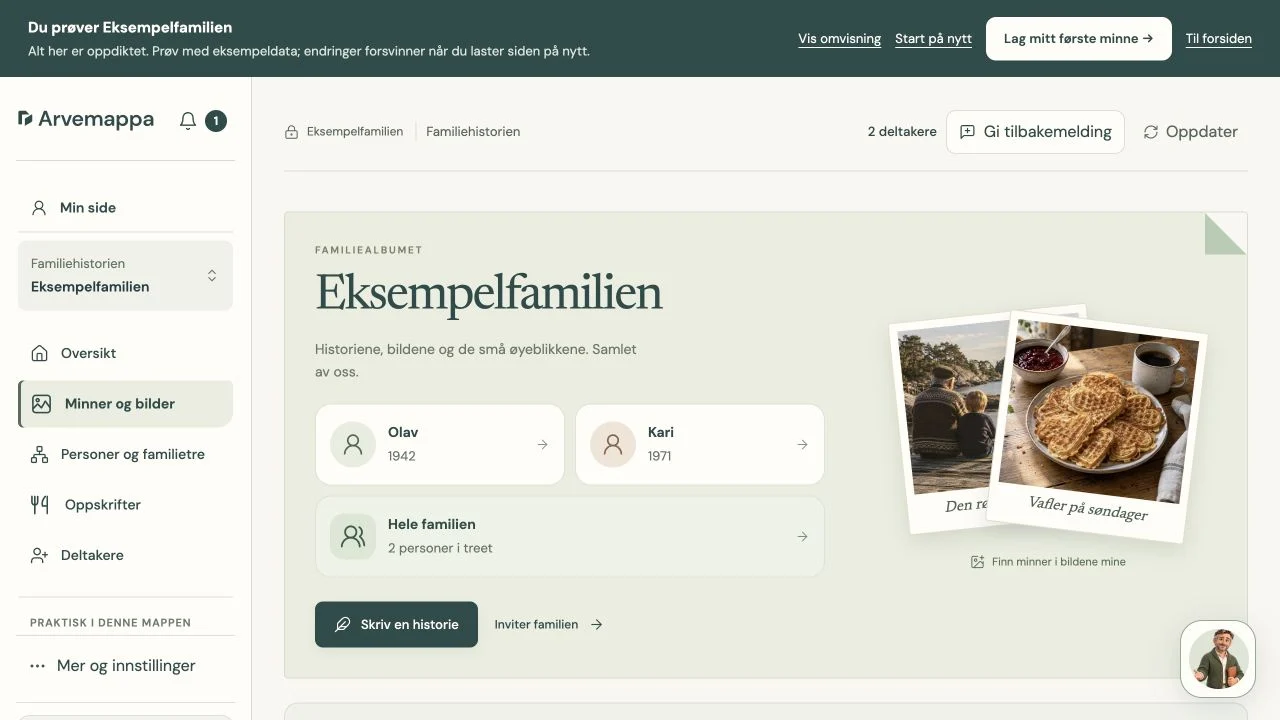
The family album shows how we have brought photos, stories and people together in one workflow. Users can find memories through a person, write a story and invite family members to join. These entry points rely on the content structure, relationships and sharing features we have developed. When planning your app, clarify how the content connects before deciding what each screen should look like.
Basic Matte: a model the learner can control
Basic Matte is another K28 venture, based on the original by Sverre H. Bautz. Development includes interactive models, explanations and practice. Here, the on-screen interaction needs to help users understand the mathematical task. Adding more effects is not a goal in itself.
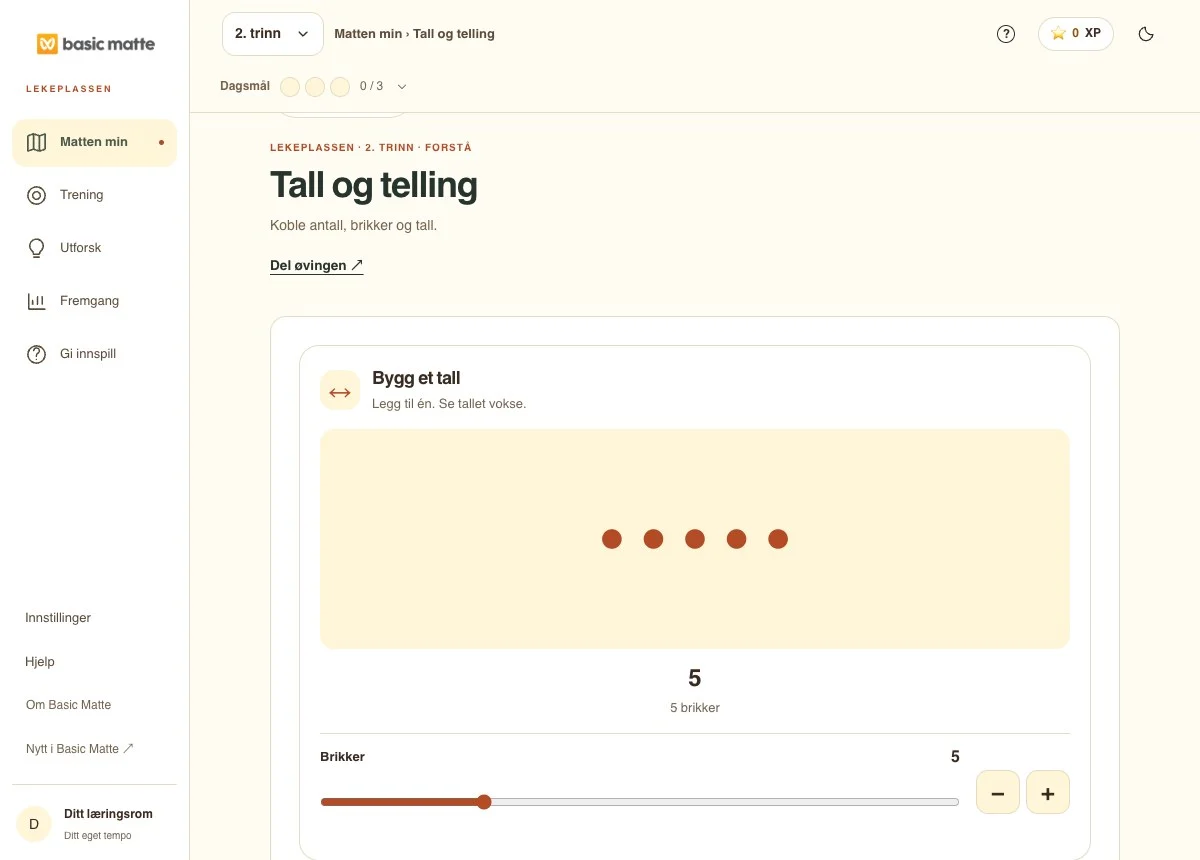
In the counting model, learners can change the quantity with a slider or the plus and minus buttons. The counters and the number represent the same value. We have developed the learning space further with models like this and routes between explanations and practice. The development task is to keep the user’s choices, the model’s state and the display consistent. The same principle applies to an app where customers select a quantity, size or other value and need clear feedback.
The projects serve different user tasks: following a service, preserving family content and exploring mathematics. They therefore need different data models, content structures and ways of providing feedback. Use them as examples of questions to clarify, rather than as a ready-made feature list for your app.
Test more than the simplest route through
Give the test participant a task without first explaining every button. Observe where they stop, what they misunderstand and whether the outcome makes sense. Also test empty lists, incorrect information, interrupted submissions and missing permissions. A solution should explain what users can do when something does not go as planned.
Check mobile, larger screens and keyboard use. Test realistic amounts of content, not just one short name and three attractive example photographs. If the work continues in another system or with a colleague, include that handover in testing.
Decide who owns and maintains the solution
Clarify ownership of code, domain, data and accounts before delivery. Define who fixes faults, handles security, takes backups and maintains content. Ask for an understandable plan for exporting data and handing over the work. A product intended for ongoing use needs more than a successful demonstration.
Separate development of the first version from ongoing operation and new features. Prioritise improvements based on actual use after launch. If the main need is to connect existing tools, a focused automation may be a better first step.
Bring a description of one user task when considering custom development and customer apps. That lets us discuss a specific need and what to test before deciding the scope.