Judge a new website on more than visitor counts. Compare traffic, usage and genuine enquiries before and after launch using matching periods and consistent definitions.
The most interesting question is often whether more of the right people find you and make contact. More page views can be positive, but may also result from more advertising, new articles or users having to visit more pages to find an answer.
Start with a clear period and a known launch date
For a seasonal website, two complete twelve-month periods are a useful starting point. Also compare each month with the same month a year earlier. This makes it easier to see whether a change is consistent, seasonal or linked to a particular moment.
Example: PEC launched its new website on 31 January 2025. February 2024–January 2025 and February 2025–January 2026 are therefore practical periods to examine. The final day of the before-period includes the transition itself, which should be noted. This is a comparison framework, not a results report for PEC. Read the project story.
If there have been major changes to domains, subsites or analytics configuration, first investigate which data actually covers the same business. Missing measurement must not be interpreted as zero activity.
Choose a small set of complementary metrics
- Users and sessions: How much relevant traffic reaches the website? Consider mobile and desktop separately.
- Search impressions, clicks and CTR: How often does the website appear in Google Search, and what share of impressions produces a click? Assess ad CTR separately.
- Engagement time: Do people spend time with the content actively on screen? State whether the report shows an average per active user or per session.
- Genuine enquiries: How many new, relevant requests arrived? Distinguish forms, confirmed phone calls and other contact methods.
- Quality: How many enquiries match the business’s services and area, and how many are followed up?
GA4 engagement time measures time with the website in focus or the app in the foreground. It is not identical to the old ‘average time on page’ measure. See Google’s definition of engagement. A short contact page can do its job well even with a low time figure.
Calculate enquiry rates with the right denominator
Two useful metrics are:
- Enquiries per 1,000 page views: Genuine enquiries divided by page views, multiplied by 1,000.
- Share of sessions with an enquiry: Sessions with at least one verified enquiry divided by all measured sessions, multiplied by 100.
The first is a ratio. The second is a session-based conversion rate and requires an enquiry to be linked to a session. Dividing CRM enquiries by page views does not calculate the share of visitors who convert.
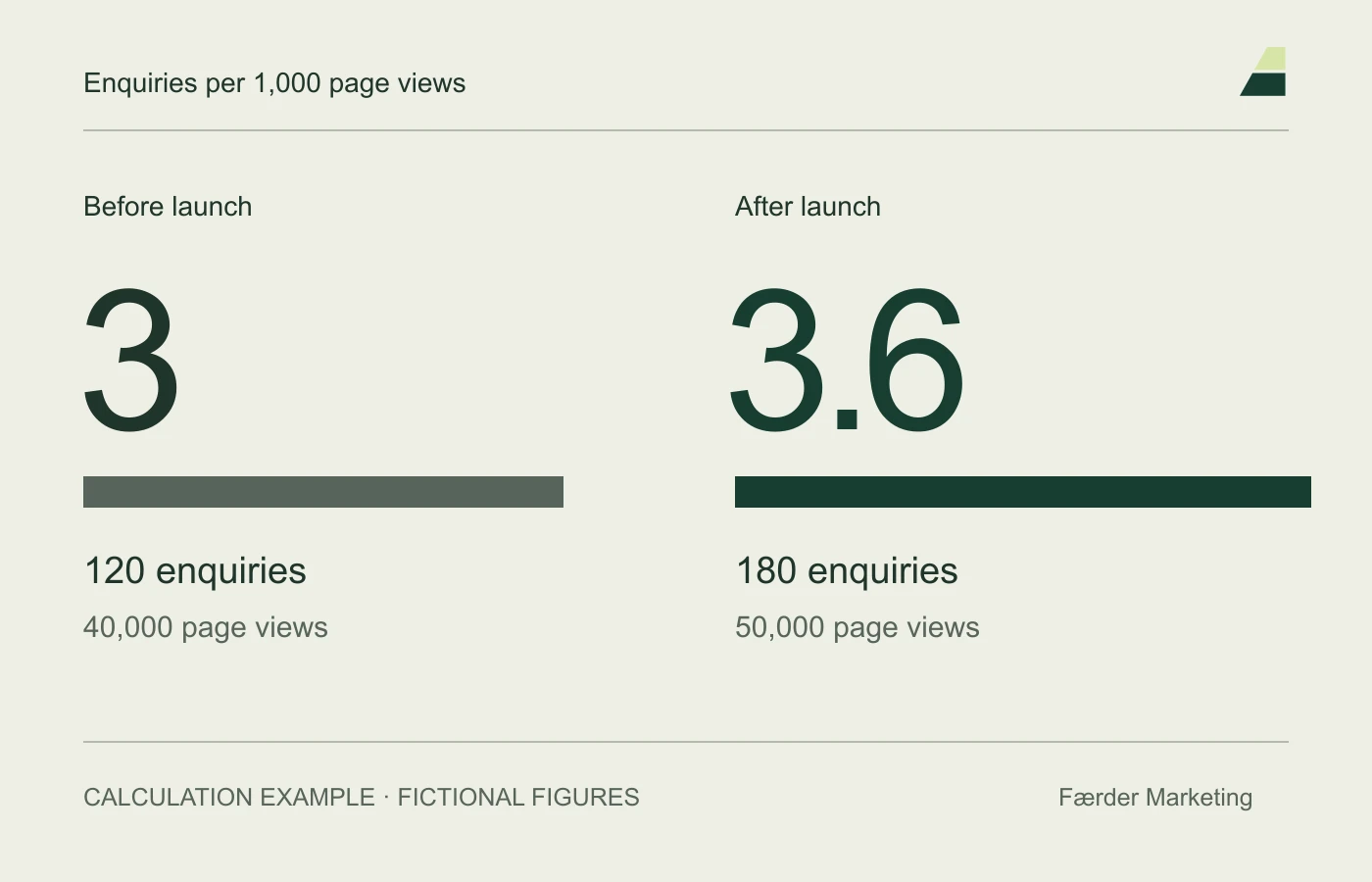
Calculation example with fictional figures: 120 genuine enquiries and 40,000 page views give 3 enquiries per 1,000 views. If the next period has 180 enquiries and 50,000 views, the rate is 3.6. The number of enquiries has risen by 50%, while the rate has risen by 20%. Both statements can be correct, but they describe different things.
For percentage rates, distinguish percentage points from percentages. A change from 2 to 3 per cent is an increase of one percentage point, or 50 per cent in relative terms.
Clean enquiry data before counting
Exclude spam, test submissions, job applications and support from sales reports. Check whether the same request was recorded more than once. You can retain raw and cleaned counts internally with a simple explanation of the filtering.
A form event in analytics is not necessarily a qualified enquiry. Google recommends a separate event for the relevant lead form rather than marking every form submission as a key event. See the guide to measuring form enquiries. Also check that the submission actually arrived.
Check what might explain the difference
Note changes to ad budgets, campaigns, prices, service areas and available capacity. Look for data collection breaks when changing consent systems, analytics or forms. Do not combine overlapping analytics properties without checking for double counting.
Organic CTR is also affected by the queries and positions where the website appears. Use Search Console’s performance report to investigate relevant pages and search groups, not just the total. Historical exports may be needed for older periods.
Make the conclusion as precise as the measurement
A good result claim states its period, scope, metric and source. ‘More enquiries after launch’ describes a change. ‘The website caused the entire increase’ is a stronger causal claim requiring more evidence.
Start with what you can actually verify. If enquiries are well documented but channel attribution is uncertain, the total can still be useful when the limitation is explained. Leave uncertain channel figures out of the conclusion.
See also the checklist for following up after launch and the new website guide.